
Seti Astro Suite Pro は、作者のFrankin Marekさんが、『綺麗な画像を得るのみではなく、マニアックな科学的なソフトにしたい。画像に含まれるデータを深く掘り下げ、他にどのような情報があるのか探ることができる。』と話しています。
賛同したので、
Python仮想環境を作り、ソースコードからローカル開発環境を構築して、Seti Astro Suite Pro 使います。
Seti Astro Suite Proを使ってみると、データを扱う事に特化してる印象を受けます。
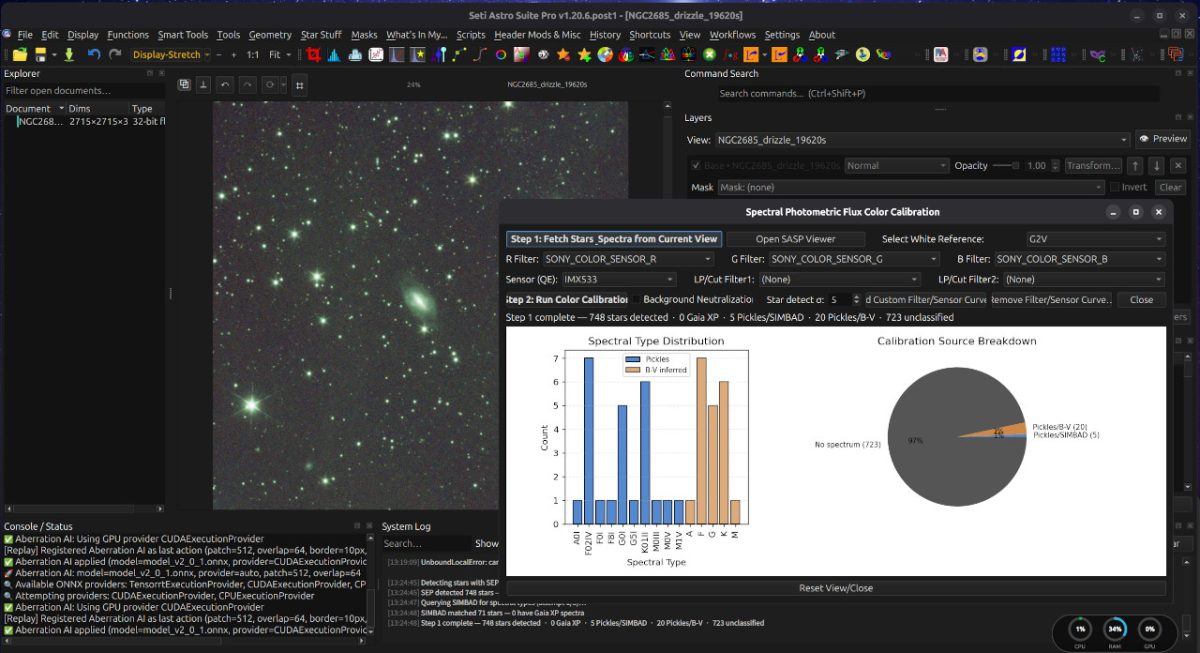
Seti Astro Suite Pro (SASpro) , Author: Franklin Marek
https://pypi.org/project/setiastrosuitepro/
ソースコードからローカル開発環境を構築する
GUN/Linux でも Windows OS でも Pythonを導入すれば、仮想環境から SetiAstro Suite Pro が使えます。
仮想環境ディレクトリを作成
# Seti Astro Suite Pro Python仮想環境ディレクトリを作成(SASP)
# setiastrosuitepro ディレクトリで良いならば、不要
# その場合は、
# python3 -m venv .venv
# source .venv/bin/activate
mkdir -p /home/$USER/.local/share/SASP

# Python 3.12.13 を使って指定パスに仮想環境を作成
python3.12 -m venv /home/$USER/.local/share/SASP/venv

# ワーキングディレクトリへ
# cd ~/.local/share/SASP

# 仮想環境を有効化 (アクティベート)
source /home/$USER/.local/share/SASP/venv/bin/activate
pip, PyTorch のインストール
python3.12 -m pip install --upgrade pippython3.12 -m pip install torch torchvision --index-url https://download.pytorch.org/whl/cu128Successfully installed MarkupSafe-3.0.3 cuda-bindings-12.9.7 cuda-pathfinder-1.6.0 cuda-toolkit-12.8.1 filelock-3.32.3 fsspec-2026.7.0 jinja2-3.1.6 mpmath-1.3.0 networkx-3.6.1 numpy-2.5.2 nvidia-cublas-cu12-12.8.4.1 nvidia-cuda-cupti-cu12-12.8.90 nvidia-cuda-nvrtc-cu12-12.8.93 nvidia-cuda-runtime-cu12-12.8.90 nvidia-cudnn-cu12-9.19.0.56 nvidia-cufft-cu12-11.3.3.83 nvidia-cufile-cu12-1.13.1.3 nvidia-curand-cu12-10.3.9.90 nvidia-cusolver-cu12-11.7.3.90 nvidia-cusparse-cu12-12.5.8.93 nvidia-cusparselt-cu12-0.7.1 nvidia-nccl-cu12-2.28.9 nvidia-nvjitlink-cu12-12.8.93 nvidia-nvshmem-cu12-3.4.5 nvidia-nvtx-cu12-12.8.90 pillow-12.3.0 setuptools-78.1.0 sympy-1.14.0 torch-2.11.0+cu128 torchvision-0.26.0+cu128 triton-3.6.0 typing-extensions-4.16.0全体で、3.2GBくらいになるでしょうか。
onnxruntime-gpu-1.26.0 を有効化
先に、pip、PyTorch 、onnxruntime-gpuを入れる必要がある。
若しくは、pip、PyTorch 、onnxruntime-cpu かな。
続いて、requirements.txt を編集する。
WWW
https://onnxruntime.ai/docs/install/
https://dev.to/deskpai/the-hidden-pitfalls-of-onnxruntime-gpu-setup-4kb7
### PyTorch 2.11.0+cu128 をインストール
### python3.12 -m pip install torch==2.11.0+cu128 torchvision==2.11.0+cu128 --index-url https://download.pytorch.org/whl/cu128

### CUDA 12.8 に必要な cuDNN 9 を導入
### python3.12 -m pip install nvidia-cudnn-cu12

# ONNX Runtime GPU版 1.26.0 を導入
python3.12 -m pip install onnxruntime-gpu==1.26.0
Successfully installed flatbuffers-25.12.19 onnxruntime-gpu-1.26.0 packaging-26.3 protobuf-7.35.1# 環境変数(LD_LIBRARY_PATH)の追加は不要?
# export LD_LIBRARY_PATH=$LD_LIBRARY_PATH:$HOME/.local/lib/python3.12/site-packages/nvidia/cudnn/lib/
# .bashrc へ追記
# Seti Astro Suite Pro Python仮想環境ディレクトリ で使う
# Seti Astro Suite Pro Python仮想環境ディレクトリ の標準的な仮想環境内のパス
### Windows OSならば、システム環境変数に追加かな?
export LD_LIBRARY_PATH="$HOME/.local/share/SASP/venv/lib/python3.12/site-packages/nvidia/cudnn/lib:$LD_LIBRARY_PATH"Seti Astro Suite Pro (SASpro), github
こちらに案内があります。
https://github.com/setiastro/setiastrosuitepro/wiki/Build:-Linux
インストールはこちらに案内があります。
Development Setup
The following procedure describes how to establish a local development environment from source. The instructions apply to all supported platforms; platform-specific commands are noted where they differ.
https://pypi.org/project/setiastrosuitepro/1.20.6/
git clone https://github.com/setiastro/setiastrosuitepro.git
cd setiastrosuitepro

# 全てのファイル、ディレクトリを親ディレクトリへ (~/.local/share/SASP)
依存関係をインストールする
依存関係から、”torch” や “onnxruntime-gpu”を削除、編集
setiastrosuitepro にある requirements.txt から、 “torch” や “onnxruntime” に関連する行を削除、もしくは、コメントアウトし、残りのパッケージ(UI用のPyQtなど)を pip install -r requirements.txt でインストール
“torch”は無いようです。
onnxruntime-directml==1.23.0 ; python_version >= "3.10" and python_version < "3.15" and sys_platform == "win32"
onnxruntime-gpu==1.24.3 ; python_version == "3.10" and sys_platform == "linux"
onnxruntime-gpu==1.25.1 ; python_version >= "3.11" and python_version < "3.15" and sys_platform == "linux"
onnxruntime==1.23.2 ; python_version >= "3.10" and python_version < "3.15" and sys_platform != "linux" and sys_platform != "win32"
PyTorchとONNX Runtimeを確認します。後でもう一度、確認します。
python -m pip show torch onnx onnxruntime-gpuWARNING: Package(s) not found: onnx
Name: torch
Version: 2.11.0+cu128
Summary: Tensors and Dynamic neural networks in Python with strong GPU acceleration
Home-page: https://pytorch.org
Author:
Author-email: PyTorch Team <packages@pytorch.org>
License: BSD-3-Clause
Location: /home/minmin/.local/share/SASP/venv/lib/python3.12/site-packages
Requires: cuda-bindings, cuda-toolkit, filelock, fsspec, jinja2, networkx, nvidia-cudnn-cu12, nvidia-cusparselt-cu12, nvidia-nccl-cu12, nvidia-nvshmem-cu12, setuptools, sympy, triton, typing-extensions
Required-by: torchvision
---
Name: onnxruntime-gpu
Version: 1.26.0
Summary: ONNX Runtime is a runtime accelerator for Machine Learning models
Home-page: https://onnxruntime.ai
Author: Microsoft Corporation
Author-email: onnxruntime@microsoft.com
License: MIT License
Location: /home/minmin/.local/share/SASP/venv/lib/python3.12/site-packages
Requires: flatbuffers, numpy, packaging, protobuf
Required-by: 依存関係をインストール
python3.12 -m pip install --upgrade pip
python3.12 -m pip install -r requirements.txt
インストールログを確認。onnxruntimeは、無い
Successfully installed aenum-3.1.17 aiobotocore-2.26.0 aiohappyeyeballs-2.6.1 aiohttp-3.13.2 aioitertools-0.13.0 aiosignal-1.4.0 astropy-7.2.0 astropy-healpix-1.1.2 astropy-iers-data-0.2025.12.8.0.38.44 astroquery-0.4.11 attrs-25.4.0 autograd-1.8.0 beautifulsoup4-4.14.3 bokeh-3.8.1 botocore-1.41.5 certifi-2025.11.12 cffi-2.0.0 charset-normalizer-3.4.4 click-8.3.1 cloudpickle-3.1.2 colorama-0.4.6 contourpy-1.3.3 cryptography-46.0.3 cycler-0.12.1 dask-2025.12.0 dask-image-2025.11.0 docopt-0.6.2 donfig-0.8.1.post1 exifread-3.5.1 fastavro-1.12.2 fbpca-1.0 flatbuffers-25.9.23 fonttools-4.61.1 frozenlist-1.8.0 fsspec-2025.12.0 gaiaxpy-2.1.4 google-crc32c-1.7.1 hdfs-2.7.3 html5lib-1.1 idna-3.11 imagecodecs-2025.11.11 imageio-2.37.2 jaraco-classes-3.4.0 jaraco-context-6.0.1 jaraco-functools-4.3.0 jeepney-0.9.0 jmespath-1.0.1 joblib-1.5.2 jplephem-2.23 keyring-25.7.0 kiwisolver-1.4.9 lazy-loader-0.5 lightkurve-2.5.1 llvmlite-0.46.0 locket-1.0.0 lz4-4.4.5 matplotlib-3.10.8 memoization-0.4.0 ml-dtypes-0.5.4 more-itertools-10.8.0 multidict-6.7.0 narwhals-2.13.0 numba-0.63.1 numcodecs-0.16.5 numpy-2.2.6 oktopus-0.1.2 onnx-1.20.0 opencv-python-headless-4.12.0.88 packaging-25.0 pandas-2.3.3 partd-1.4.2 patsy-1.0.2 photutils-2.3.0 pillow-12.0.0 pims-0.7 plotly-6.5.0 propcache-0.4.1 protobuf-6.33.2 psutil-7.1.3 py-cpuinfo-9.0.0 pyarrow-22.0.0 pyavm-0.9.8 pycparser-2.23 pyerfa-2.0.1.5 pyopengl-3.1.10 pyparsing-3.2.5 pypdfium2-5.7.1 pyqt6-6.10.1 pyqt6-qt6-6.10.1 pyqt6-sip-13.10.3 pyqtgraph-0.14.0 python-dateutil-2.9.0.post0 pytz-2025.2 pyvo-1.8 pywavelets-1.9.0 pyyaml-6.0.3 rawpy-0.27.0 reproject-0.19.0 requests-2.32.5 s3fs-2025.12.0 scikit-image-0.26.0 scikit-learn-1.8.0 scipy-1.16.3 secretstorage-3.5.0 sep-1.4.1 sgp4-2.25 six-1.17.0 skyfield-1.53 slicerator-1.1.0 soupsieve-2.8 threadpoolctl-3.6.0 tifffile-2025.12.12 toolz-1.1.0 tornado-6.5.3 tqdm-4.67.1 typing-extensions-4.15.0 tzdata-2025.3 tzlocal-5.3.1 uncertainties-3.2.3 urllib3-2.6.2 webencodings-0.5.1 wrapt-1.17.3 xisf-0.9.5 xyzservices-2025.11.0 yarl-1.22.0 zarr-3.1.5 zstandard-0.25.0Seti Astro Suite Proをインストール
python3.12 -m pip install -e .Obtaining file:///home/minmin/.local/share/SASP
Installing build dependencies ... done
Checking if build backend supports build_editable ... done
Getting requirements to build editable ... done
Preparing editable metadata (pyproject.toml) ... done
Requirement already satisfied: GaiaXPy<3.0.0,>=2.1.4 in ./venv/lib/python3.12/site-packages (from setiastrosuitepro==1.21.0) (2.1.4)
途中略
Requirement already satisfied: sgp4>=2.13 in ./venv/lib/python3.12/site-packages (from skyfield->setiastrosuitepro==1.21.0) (2.25)
Building wheels for collected packages: setiastrosuitepro
Building editable for setiastrosuitepro (pyproject.toml) ... done
Created wheel for setiastrosuitepro: filename=setiastrosuitepro-1.21.0-py3-none-any.whl size=22553 sha256=7fd2451c21bb5eaf826a707fbd42705be5ca0acd1554a7b2bbdb22e26d8e2006
Stored in directory: /tmp/pip-ephem-wheel-cache-a1cs7u8j/wheels/39/e1/49/25a60d18eecf364dc5470f48a41e18da4ecbe898526782c568
Successfully built setiastrosuitepro
Installing collected packages: setiastrosuitepro
Successfully installed setiastrosuitepro-1.21.0pip install -e .
“pip install -e . “が大切だとフランクは言っている。
『GitHubから取得したい場合は、まず必ず pip install -e を実行してください。』
この操作は、Python 環境に対して次を行う。
・パッケージメタデータを登録
・site-packages に .pth またはシンボリックリンクを作成
・元ディレクトリを import 対象として恒久的に追加
「このディレクトリは常に import 可能な正式ライブラリである」と Python に宣言している。
https://zenn.dev/colorfulwave/articles/7df566052ea674
解説、有難うございます。
pip install -e . は、現在いるSASPのソースコードディレクトリを、Python環境に「編集可能モード(editable install)」でインストールするとの意味です。
~/.local/share/SASP/で行う、pip install -e .
” . ” は、現在のディレクトリ ~/.local/share/SASPを示しています。
-e は –editable(編集可能) の略です。
「このディレクトリにあるSASPを、このvenvからPythonパッケージとして利用できるよう登録する」との意味になります。
インストールログ
python3.12 -m pip install -e .
Obtaining file:///home/USERNAME/.local/share/SASP
  Installing build dependencies ... done
  Checking if build backend supports build_editable ... done
  Getting requirements to build editable ... done
  Preparing editable metadata (pyproject.toml) ... done
Requirement already satisfied: GaiaXPy<3.0.0,>=2.1.4 in ./venv/lib/python3.12/site-packages (from setiastrosuitepro==1.20.6) (2.1.4)

Requirement already satisfied: sgp4>=2.13 in ./venv/lib/python3.12/site-packages (from skyfield->setiastrosuitepro==1.20.6) (2.25)
Building wheels for collected packages: setiastrosuitepro
  Building editable for setiastrosuitepro (pyproject.toml) ... done
  Created wheel for setiastrosuitepro: filename=setiastrosuitepro-1.20.6-py3-none-any.whl size=22537 sha256=7813563576e9afcba9f55435e449963c0be07a60945e45d51db0f3894be781f3
  Stored in directory: /tmp/pip-ephem-wheel-cache-t9fp98bf/wheels/39/e1/49/25a60d18eecf364dc5470f48a41e18da4ecbe898526782c568
Successfully built setiastrosuitepro
Installing collected packages: setiastrosuitepro
Successfully installed setiastrosuitepro-1.20.6
python3.12 -m pip checkpython3.12 -m pip check は、現在のPython環境にインストールされているパッケージ同士の依存関係に問題がないか検査するコマンドです。
PyTorchとONNX Runtimeが変わっていないか確認します。
python -m pip show torch onnx onnxruntime-gpuSeti Astro Suite Pro起動
# source venv/bin/activate
/home/$USER/.local/share/SASP/venv/bin/activate

### python3.12 -m setiastro.saspro
python3.12 setiastrosuitepro.py
Seti Astro Suite Pro 起動ログ
Qt platform: wayland
QuitOnLastWindowClosed: True
XDG_SESSION_TYPE: wayland
QT_QPA_PLATFORM: None
QT_OPENGL: None
Looking in links: /tmp/tmpo0ecqee2
Requirement already satisfied: pip in /home/USERNAME/.local/share/SASpro/runtime/py312/venv/lib/python3.12/site-packages (25.0.1)
Requirement already satisfied: pip in /home/USERNAME/.local/share/SASpro/runtime/py312/venv/lib/python3.12/site-packages (25.0.1)
Collecting pip
  Using cached pip-26.2.1-py3-none-any.whl.metadata (4.6 kB)
Collecting wheel
  Using cached wheel-0.48.0-py3-none-any.whl.metadata (2.3 kB)
Collecting setuptools
  Using cached setuptools-84.0.0-py3-none-any.whl.metadata (6.6 kB)
Collecting packaging>=24.0 (from wheel)
  Using cached packaging-26.3-py3-none-any.whl.metadata (3.5 kB)
Using cached pip-26.2.1-py3-none-any.whl (1.8 MB)
Using cached wheel-0.48.0-py3-none-any.whl (33 kB)
Using cached setuptools-84.0.0-py3-none-any.whl (818 kB)
Using cached packaging-26.3-py3-none-any.whl (129 kB)
Installing collected packages: setuptools, pip, packaging, wheel
  Attempting uninstall: pip
    Found existing installation: pip 25.0.1
    Uninstalling pip-25.0.1:
      Successfully uninstalled pip-25.0.1
Successfully installed packaging-26.3 pip-26.2.1 setuptools-84.0.0 wheel-0.48.0
root - INFO - Logging initialized -> logs/saspro.log
root - INFO - Platform: linux
root - INFO - PyInstaller bundle: False
root - INFO - Faulthandler crash log: logs/saspro_crash.log
System is in Dark Mode
root - INFO - Qt: OpenType support missing for "Ubuntu Sans", script 11 (None:0)

   _____      __  _ ___         __            _____       _ __       ____
  / ___/___  / /_(_)   |  _____/ /__________ / ___/__  __(_) /____  / __ \_________
  \__ \/ _ \/ __/ / /| | / ___/ __/ ___/ __ \\__ \/ / / / / __/ _ \/ /_/ / ___/ __ \
 ___/ /  __/ /_/ / ___ |(__  ) /_/ /  / /_/ /__/ / /_/ / / /_/  __/ ____/ /  / /_/ /
/____/\___/\__/_/_/  |_/____/\__/_/   \____/____/\__,_/_/\__/\___/_/   /_/   \____/

Seti Astro Suite Pro v1.20.6.post1 (build 2026-08-16T17:54:03Z) up and running!
2026-08-17 13:03:46,080 - root - INFO - Numba threading layer resolved: tbb
“pip-26.2.1” を削除し、”pip-25.0.1″をインストールし直しています。
From Franklin
SASproは巨大なプロジェクトです。何千時間もの開発時間を費やして、私が心から誇りに思うもの――誰でも利用できる、本格的な機能を備えた天体写真処理および科学分析プラットフォーム――を構築しました。
このプロジェクトは、深宇宙の撮影に対する純粋な愛情と、「高性能なツールは誰もが利用できるようにすべきだ」という信念から生まれました。光害のある裏庭から撮影する場合でも、暗い空の観測地から撮影する場合でも、微かな星雲を追いかける場合でも、トランジット系外惑星を追いかける場合でも、SASproは常に皆様のそばに寄り添うよう設計されています。この旅に共に参加してくださり、ありがとうございます。晴天を祈ります。
— フランクリン・マレク
Franklin Marek さんに感謝します。
“onnxruntime-gpu-1.25.1″がインストールされた時のログ
Successfully installed aenum-3.1.17 aiobotocore-2.26.0 aiohappyeyeballs-2.6.1 aiohttp-3.13.2 aioitertools-0.13.0 aiosignal-1.4.0 astropy-7.2.0 astropy-healpix-1.1.2 astropy-iers-data-0.2025.12.8.0.38.44 astroquery-0.4.11 attrs-25.4.0 autograd-1.8.0 beautifulsoup4-4.14.3 bokeh-3.8.1 botocore-1.41.5 certifi-2025.11.12 cffi-2.0.0 charset-normalizer-3.4.4 click-8.3.1 cloudpickle-3.1.2 colorama-0.4.6 contourpy-1.3.3 cryptography-46.0.3 cycler-0.12.1 dask-2025.12.0 dask-image-2025.11.0 docopt-0.6.2 donfig-0.8.1.post1 exifread-3.5.1 fastavro-1.12.2 fbpca-1.0 flatbuffers-25.9.23 fonttools-4.61.1 frozenlist-1.8.0 fsspec-2025.12.0 gaiaxpy-2.1.4 google-crc32c-1.7.1 hdfs-2.7.3 html5lib-1.1 idna-3.11 imagecodecs-2025.11.11 imageio-2.37.2 jaraco-classes-3.4.0 jaraco-context-6.0.1 jaraco-functools-4.3.0 jeepney-0.9.0 jmespath-1.0.1 joblib-1.5.2 jplephem-2.23 keyring-25.7.0 kiwisolver-1.4.9 lazy-loader-0.5 lightkurve-2.5.1 llvmlite-0.46.0 locket-1.0.0 lz4-4.4.5 matplotlib-3.10.8 memoization-0.4.0 ml-dtypes-0.5.4 more-itertools-10.8.0 multidict-6.7.0 narwhals-2.13.0 numba-0.63.1 numcodecs-0.16.5 numpy-2.2.6 oktopus-0.1.2 onnx-1.20.0 onnxruntime-gpu-1.25.1 opencv-python-headless-4.12.0.88 packaging-25.0 pandas-2.3.3 partd-1.4.2 patsy-1.0.2 photutils-2.3.0 pillow-12.0.0 pims-0.7 plotly-6.5.0 propcache-0.4.1 protobuf-6.33.2 psutil-7.1.3 py-cpuinfo-9.0.0 pyarrow-22.0.0 pyavm-0.9.8 pycparser-2.23 pyerfa-2.0.1.5 pyopengl-3.1.10 pyparsing-3.2.5 pypdfium2-5.7.1 pyqt6-6.10.1 pyqt6-qt6-6.10.1 pyqt6-sip-13.10.3 pyqtgraph-0.14.0 python-dateutil-2.9.0.post0 pytz-2025.2 pyvo-1.8 pywavelets-1.9.0 pyyaml-6.0.3 rawpy-0.27.0 reproject-0.19.0 requests-2.32.5 s3fs-2025.12.0 scikit-image-0.26.0 scikit-learn-1.8.0 scipy-1.16.3 secretstorage-3.5.0 sep-1.4.1 sgp4-2.25 six-1.17.0 skyfield-1.53 slicerator-1.1.0 soupsieve-2.8 threadpoolctl-3.6.0 tifffile-2025.12.12 toolz-1.1.0 tornado-6.5.3 tqdm-4.67.1 typing-extensions-4.15.0 tzdata-2025.3 tzlocal-5.3.1 uncertainties-3.2.3 urllib3-2.6.2 webencodings-0.5.1 wrapt-1.17.3 xisf-0.9.5 xyzservices-2025.11.0 yarl-1.22.0 zarr-3.1.5 zstandard-0.25.0setiastrosuitepro というパッケージの情報と、関連ファイルの一覧を表示
python3.12 -m pip show -f setiastrosuiteproName: setiastrosuitepro
Version: 1.21.0
Summary: Seti Astro Suite Pro - Advanced astrophotography toolkit for image calibration, stacking, registration, photometry, and visualization
Home-page: https://www.setiastro.com
Author: Franklin Marek
Author-email: frank@setiastro.com
License: GPL-3.0
Location: /home/USERNAME/.local/share/SASP/venv/lib/python3.12/site-packages
Editable project location: /home/USERNAME/.local/share/SASP
Requires: astropy, astroquery, exifread, GaiaXPy, imagecodecs, imageio, jplephem, lightkurve, lz4, matplotlib, numba, numpy, nvidia-ml-py, oktopus, onnx, onnxruntime-gpu, opencv-python-headless, pandas, photutils, Pillow, plotly, psutil, py-cpuinfo, PyOpenGL, pypdfium2, PyQt6, pyqtgraph, pytz, pywavelets, rawpy, reproject, requests, scikit-image, scipy, sep, skyfield, tifffile, tzlocal, xisf, zstandard
Required-by:
Files:
../../../bin/cosmicclarity
../../../bin/saspro-export-requirements
../../../bin/saspro-prime-matplotlib-cache
../../../bin/saspro-write-build-info
../../../bin/setiastrosuitepro
setiastrosuitepro-1.21.0.dist-info/INSTALLER
setiastrosuitepro-1.21.0.dist-info/METADATA
setiastrosuitepro-1.21.0.dist-info/RECORD
setiastrosuitepro-1.21.0.dist-info/REQUESTED
setiastrosuitepro-1.21.0.dist-info/WHEEL
setiastrosuitepro-1.21.0.dist-info/direct_url.json
setiastrosuitepro-1.21.0.dist-info/entry_points.txt
setiastrosuitepro-1.21.0.dist-info/licenses/LICENSE
setiastrosuitepro.pthSeti Astro Suite Pro 起動スクリプト
~/.local/share/SASP/start-saspro.sh を作ります。
#!/bin/bash

SASP_DIR="$HOME/.local/share/SASP"
VENV_DIR="$SASP_DIR/venv"

cd "$SASP_DIR" || exit 1

source "$VENV_DIR/bin/activate"

exec python3.12 setiastrosuitepro.py
若しくは、
../../../bin/setiastrosuitepro
との記述があるので、
~/.local/share/SASP/venv/bin/setiastrosuitepro
起動ファイルを用いるならば。
#!/bin/bash

SASP_DIR="$HOME/.local/share/SASP"
VENV_DIR="$SASP_DIR/venv"

cd "$SASP_DIR" || exit 1
source "$VENV_DIR/bin/activate"

exec setiastrosuitepro
TensorRT を確認
python3.12 -m pip list | grep -i tensorrt無い。
[‘TensorrtExecutionProvider’, ‘CUDAExecutionProvider’, ‘CPUExecutionProvider’]
onnxruntime-gpu は、ビルド/パッケージに応じて TensorRT Execution Provider のサポートを持っていても、Pythonから import tensorrt するTensorRT Pythonパッケージが別途存在するとは限らないらしい。
### 現在の環境
onnxruntime-gpu 1.26.0
        │
        ├── CUDAExecutionProvider       ✓
        │
        └── TensorrtExecutionProvider  ✓ ← プロバイダーとして登録可能

tensorrt Python package
        └── 未インストール
((venv) ) pip install setiastrosuitepro を使ったインストール
こちらは試していません。
仮想環境ディレクトリを作成
# Seti Astro Suite Pro Python仮想環境ディレクトリを作成
mkdir -p /home/$USER/.local/share/SASP

# Python 3.12.13 を使って指定パスに仮想環境を作成
python3.12 -m venv /home/$USER/.local/share/SASP/venv

# 仮想環境を有効化 (アクティベート)
source /home/$USER/.local/share/SASP/venv/bin/activate
pip, PyTorch のインストール
python3.12 -m pip install --upgrade pippython3.12 -m pip install torch torchvision --index-url https://download.pytorch.org/whl/cu128ONNX Runtime GPU インストール
### 以前にruntimeをインストールしているならば、その関連パッケージを削除
### python3.12 -m pip uninstall onnxruntime onnxruntime-gpu

# version 1.26をインストールします。
# これ以降のバージョンは、CUDA 13.0 を使用してビルドされています。
python3.12 -m pip install onnxruntime-gpu==1.26.0
SetiAstroSuitePro インストール
pip install setiastrosuitepro
コメント