Siril , [Stacking]各設定よりもスクリプト
Sirilで天体画像を処理していく時に、画面にある、
[Calibration] や、[Registration]、[Registration]などのパラメータを調整したり、
[Stacking]では、
“Stacking methods”「積み重ねの方法」には、”Average Stacking With Rejection”
“Rejection methods”「除去方法」には、”MAD Clipping”
“weighting”「」には、”weighting”
などを細部に指定すると、好みの前処理が行なえます。
しかし、手順が増える。。。
無精な自分は、
スクリプトに指定を埋め込んで、処理をします。その為のスクリプト変更についてのメモです。
Sirilスクリプト
Sirilスクリプトは下記URLにあります。これを元に、変更していきます。
Siril Copyright © 2012-2023, Team free-astro
<https://free-astro.org/index.php/Siril>, <https://www.siril.org>
https://gitlab.com/free-astro/siril/Siril Scripts
https://gitlab.com/free-astro/siril/-/tree/master/scripts
Sirilスクリプト、及び、 Pythonスクリプトは以下URLにあります。
Siril 外部スクリプトリポジトリ
このリポジトリは、画像の操作や処理のさまざまな段階を効率化するために、皆様のようなユーザーから提供されたスクリプトを集めたものです。前処理作業の効率化や、複雑な処理操作の最適化をお考えの場合でも、ここで役立つスクリプトが見つかるはずです。
https://gitlab.com/free-astro/siril-scripts
[Stacking]各設定
Average Stacking With Rejection
This method of stacking computes a mean of the pixels in a stack after having excluded deviant pixels and an optional normalisation of the images against the reference image. As for sum stacking, the improvement in SNR is proportional to √𝑁
. There are several ways to normalize the images and several ways to detect and replace or exclude deviant pixels, explained below.
https://siril.readthedocs.io/en/latest/preprocessing/stacking.html#stacking-methods
このスタック法では、異常なピクセルを除外した後、スタック内のピクセルの平均値を算出し、必要に応じて参照画像に対して画像の正規化を行います。和スタックと同様に、SNRの改善度は√𝑁に比例します。
画像の正規化にはいくつかの方法があり、異常なピクセルの検出・置換または除外にもいくつかの方法があります。これらについては以下で説明します。
Percentile Clipping:パーセンタイル・クリッピング:これは、小規模なデータセット(最大6画像)に最適な1ステップの除去アルゴリズムです。
Sigma Clipping:シグマ・クリッピング:これは反復アルゴリズムであり、中央値からの距離が、シグマ単位で指定された2つの値(𝜎 low、𝜎 high)よりも遠いピクセルを除去します。
MAD Clipping:MADクリッピング:これはシグマクリッピングと同様に動作する反復アルゴリズムですが、使用される推定量が中央値絶対偏差(MAD)である点が異なります。これは一般的に、ノイズの多い赤外線画像の処理に使用されます。
Median Sigma Clipping:中央値シグマクリッピング:これはシグマクリッピングと同じアルゴリズムですが、除外されたピクセルがスタックの中央値で置き換えられる点が異なります。
Winsorized Sigma Clipping:ウィンザー化シグマクリッピング:これはシグマクリッピング法と非常に似ていますが、外れ値の検出に対してより頑健であると考えられています。Huber の研究を参照してください。
Generalized Extreme Studentized Deviate Test :これは、近似的に正規分布に従う単変量データセットから 1 つまたは複数の外れ値を検出するために使用される、グラブス検定の一般化です。このアルゴリズムは、50枚以上の画像からなる大規模なデータセットにおいて優れた性能を発揮する。
Linear Fit Clipping :線形フィット・クリッピング:ピクセルスタックに最適な直線(𝑦 =𝑎𝑥 +𝑏)をフィッティングし、外れ値を排除する。このアルゴリズムは、大規模なスタックや、空間分布や方向が異なる空のグラデーションを含む画像において、非常に良好な性能を発揮する。
https://siril.readthedocs.io/en/latest/preprocessing/stacking.html#rejection-methods
Note that for drizzled CFA images, you may find difficulty in achieving satisfactory rejection in the Red and Blue channels with some methods. In these cases the MAD Clipping method appears to be the most effective.
https://siril.readthedocs.io/en/latest/preprocessing/stacking.html#rejection-methods
ドリズル処理されたCFA画像の場合、一部の手法では赤チャンネルおよび青チャンネルで満足のいくノイズ除去が困難な場合があります。このような場合、MADクリッピング法が最も効果的であるようです。
この記述があったので、MAD Clippingを用いることにしました。確かにここで現れるノイズに悩まされました。
Images filtering/weighting
weighted FWHM:これは単純なFWHMを改良したものです。参照画像と比較して検出された星の数を用いることで、より多くの偽画像を除外することができます(星ベースのレジストレーションのみ)。
https://siril.readthedocs.io/en/stable/preprocessing/stacking.html#image-rejection
Siril Script が意味するところ
Siril 1.5向けに行います。
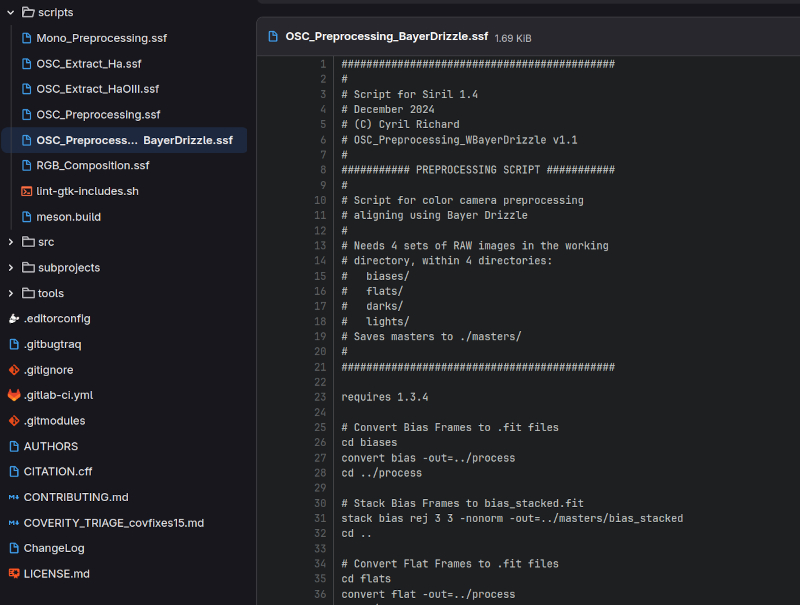
OSC_Preprocessing_BayerDrizzle.ssf
https://gitlab.com/free-astro/siril/-/blob/master/scripts/OSC_Preprocessing_BayerDrizzle.ssf?ref_type=heads
OSC_Preprocessing_BayerDrizzle.ssf
バイアス、フラット、ダークはひとまず、オリジナルのまま
Cosmetic Correctionを行わない
シグマクリップには、MADクリップを用いる
weighted FWHM
処理ファイル保存には、日付と時間をファイル名に入れる
calibrate
calibrate
https://siril.readthedocs.io/en/latest/Commands.html#calibrate
calibrate sequencename [-bias=filename] [-dark=filename] [-flat=filename] [-cc=dark [siglo sighi] || -cc=bpm bpmfile] [-cfa] [-debayer] [-fix_xtrans] [-equalize_cfa] [-opt[=exp]] [-all] [-prefix=] [-fitseq]-cc=dark: これを行いたくないので外します。
マスターダーク(-dark= オプションでマスターダークを指定する必要があります)からホットピクセルとコールドピクセルを検出できます。
-equalize_cfa:
キャリブレーション済み画像の色かぶりを防ぐためにマスターフラットのRGBレイヤーの平均輝度を均一化する。
register
register
https://siril.readthedocs.io/en/latest/Commands.html#register
register sequencename [-2pass] [-selected] [-prefix=] [-scale=]
register sequencename ... [-layer=] [-transf=] [-minpairs=] [-maxstars=] [-nostarlist] [-disto=]
register sequencename ... [-interp=] [-noclamp] [-extref=filepath]
register sequencename ... [-drizzle [-pixfrac=] [-kernel=] [-flat=]]
-kernel=square と -kernel=gaussian の違い
-kernel=square :明確な四角状
□□
□□
-kernel=gaussian :中心が明確、周辺は弱い
ガウシアン状
stack
stack
https://siril.readthedocs.io/en/latest/Commands.html#stack
stack seqfilename
stack seqfilename { sum | min | max } [-output_norm] [-out=filename] [-maximize] [-upscale] [-32b]
stack seqfilename { med | median } [-nonorm, -norm=] [-fastnorm] [-rgb_equal] [-output_norm] [-out=filename] [-32b]
stack seqfilename { rej | mean } [rejection type] [sigma_low sigma_high]  [-rejmap[s]] [-nonorm, -norm=] [-fastnorm] [-overlap_norm] [-weight={noise|wfwhm|nbstars|nbstack}] [-feather=] [-rgb_equal] [-output_norm] [-out=filename] [-maximize] [-upscale] [-32b]
Stacking with rejection:
Stacking with rejection:
Types rej or mean require the use of additional arguments for rejection type and values. The rejection type is one of n[one], p[ercentile], s[igma], m[edian], w[insorized], l[inear], g[eneralized], [m]a[d] for Percentile, Sigma, Median, Winsorized, Linear-Fit, Generalized Extreme Studentized Deviate Test or k-MAD clipping. If omitted, the default Winsorized is used.
The sigma low and sigma high parameters of rejection are mandatory unless none is selected.
Optionally, rejection maps can be created, showing where pixels were rejected in one (-rejmap) or two (-rejmaps, for low and high rejections) newly created images.
https://siril.readthedocs.io/en/latest/Commands.html#stack
rej または mean タイプでは、除去の種類と値を示す追加の引数が必要です。除外タイプは、n[one]、p[ercentile]、s[igma]、m[edian]、w[insorized]、l[inear]、g[eneralized]、[m]a[d](パーセンタイル、シグマ、中央値、ウィンソライズ、線形フィット、一般化極値スチューデント偏差検定、または k-MAD クリッピング)のいずれかです。
省略された場合、デフォルトの「Winsorized」が使用されます。
「rejection」の sigma low および sigma high パラメータは、何も選択されていない場合を除き、必須です。
オプションとして、1枚(-rejmap)または2枚(-rejmaps、低値および高値の除去用)の新規作成された画像に、ピクセルが除去された箇所を示す除去マップを作成することができます。
Other options for rejection stacking:
Weighting can be applied to the images of the sequences using the option -weight= followed by:
noise to add larger weights to frames with lower background noise.
nbstack to weight input images based on how many images were used to create them, useful for live stacking.
nbstars or wfwhm to weight input images based on number of stars or wFWHM computed during registration step.
-feather= option will apply a feathering mask on each image borders over the distance (in pixels) given in argument.
https://siril.readthedocs.io/en/latest/Commands.html#stack-weight= オプションの後に以下の指定を行うことで、シーケンスの画像に重み付けを行うことができます。
noise:背景ノイズの少ないフレームに大きな重みを追加します。
nbstack:入力画像の作成に使用された画像数に基づいて重み付けを行います。ライブスタッキングに有用です。
nbstars または wfwhm:登録ステップで計算された星の数または wFWHM に基づいて、入力画像に重み付けを行います。
-feather= オプションを使用すると、引数で指定された距離(ピクセル単位)分、各画像の境界にフェザリングマスクが適用されます。
FWHM = Full Width at Half Maximum
FWHMが低いと星像が鋭く、シーイングが良い。
FWHMが高いと星像がボケている、ピントや追尾が悪い。
wfwhm
-weight=wfwhmは、FWHMと星の数を組み合わせて、各画像に重みを付けるらしい。
Weighted FWHM weights individual frames based on wFWHM computed during registration step. This is a FWHM weighted by the number of stars in the image. For the same FWHM measurement, an image with more stars will have a better wFWHM than an image with fewer stars.
https://siril.readthedocs.io/ja/latest/preprocessing/stacking.html?utm_source=chatgpt.com#images-filtering-weighting重み付けFWHMは、位置合わせステップで算出されたwFWHMに基づいて、個々のフレームに重み付けを行います。これは、画像内の星の数で重み付けされたFWHMです。同じFWHMの測定値であっても、星の多い画像ほど、星の少ない画像よりも優れたwFWHM値となります。
スクリプトを変更する
OSC_Preprocessing_BayerDrizzle を変更します。
コスメティック補正(Cosmetic Correction)を行わない
Align lights with Drizzle
square オプション
gaussian オプション
Stack calibrated lights
MAD Clipping 3 3
低いnoise画像へ重み付け
wFWHM重み付け
保存名、撮影時間と時刻
以下は、複数の条件を載せています。後日、別にします。
Syntax example
save時の構文は以下URLを参照します。
https://siril.readthedocs.io/zh-tw/latest/Pathparsing.html?utm_source=chatgpt.com
例えば、天体名を表示するならば、
$OBJECT:%s$_############################################
#
# Script for Siril 1.4
# December 2024
# (C) Cyril Richard
# OSC_Preprocessing_WBayerDrizzle v1.1
#
########### PREPROCESSING SCRIPT ###########
#
# Script for color camera preprocessing
# aligning using Bayer Drizzle
#
# Needs 4 sets of RAW images in the working
# directory, within 4 directories:
# biases/
# flats/
# darks/
# lights/
# Saves masters to ./masters/
#
############################################
requires 1.3.4
# Convert Bias Frames to .fit files
cd biases
convert bias -out=../process
cd ../process
# Stack Bias Frames to bias_stacked.fit
stack bias rej 3 3 -nonorm -out=../masters/bias_stacked
cd ..
# Convert Flat Frames to .fit files
cd flats
convert flat -out=../process
cd ../process
# Calibrate Flat Frames
calibrate flat -bias=../masters/bias_stacked
# Stack Flat Frames to pp_flat_stacked.fit
stack pp_flat rej 3 3 -norm=mul -out=../masters/pp_flat_stacked
cd ..
# Convert Dark Frames to .fit files
cd darks
convert dark -out=../process
cd ../process
# Stack Dark Frames to dark_stacked.fit
stack dark rej 3 3 -nonorm -out=../masters/dark_stacked
cd ..
# Convert Light Frames to .fit files
cd lights
convert light -out=../process
cd ../process
##### Calibrate Light Frames #####
### Calibrate Light Frames
### calibrate light -dark=../masters/dark_stacked -flat=../masters/pp_flat_stacked -cc=dark -cfa -equalize_cfa
# コスメティック補正(Cosmetic Correction)を行わない
calibrate light -dark=../masters/dark_stacked -flat=../masters/pp_flat_stacked -cfa -equalize_cfa
####################################
##### Align lights with Drizzle Section #####
# Align lights with Drizzle, square オプション
register pp_light -drizzle -scale=1.0 -pixfrac=1.0 -kernel=square -flat=../masters/pp_flat_stacked
# Align lights with Drizzle, gaussian オプション
### register pp_light -drizzle -scale=1.0 -pixfrac=1.0 -kernel=gaussian -flat=../masters/pp_flat_stacked
#############################################
##### Stack calibrated lights Section #####
### Stack calibrated lights to result.fit
###stack r_pp_light rej 3 3 -norm=addscale -output_norm -rgb_equal -32b -out=result
### Stack calibrated lights, MAD Clipping 3 3
### stack r_pp_light rej a 3 3 -norm=addscale -output_norm -rgb_equal -32b -out=result
### Stack calibrated lights, MAD Clipping 4 4
### stack r_pp_light rej a 4 4 -norm=addscale -output_norm -rgb_equal -32b -out=result
# Stack calibrated lights, MAD Clipping 4 4, 低いnoise画像へ重み付け
stack r_pp_light rej a 4 4 -weight=noise -norm=addscale -output_norm -rgb_equal -32b -out=result
### Stack calibrated lights, MAD Clipping 3 3, wFWHM重み付け
### stack r_pp_light rej a 4 4 -weight=wfwhm -norm=addscale -output_norm -rgb_equal -32b -out=result
### flipping無しならば、outでファイル名指定
### stack r_light rej mad 3 3 -norm=addscale -weight=noise -output_norm -rgb_equal -32b -out=../final_drizzle_$LIVETIME:%d$s_$DATE:dt$
############################################
# and flipping if required
load result
mirrorx -bottomup
### 保存名、撮影時間と時刻
### 撮影時間のみ
### save ../result_drizzle_$LIVETIME:%d$s
### 撮影時間と時刻
### $LIVETIME と $DATE を組み合わせ
### save ../result_drizzle_$LIVETIME:%d$s_$DATE:dt$
# 天体名と撮影時間と時刻
### $OBJECT と $LIVETIME 、 $DATE を組み合わせ
save ../$OBJECT:%s$_drizzle_$LIVETIME:%d$s_$DATE:dt$
cd ..
close
コメント